Three projects tracing my growth in manual QA: from task validation and saved data, to checkout calculations, booking rules, and account roles. I turn requirements into checks, compare expected and actual behavior, and make findings traceable.
Focus
Manual QA + UX evaluation
Projects
TaskFlow, ShopFlow & BookingFlow
Period
October 2026
Context
Independent guided practice
03Completed scoped projects
39Manual test executions
06Documented defect observations
The logs record 32 Pass and 7 Fail outcomes across practice builds, supported by 63 screenshots and one report-only run. Retests are executions, not new case designs. These totals describe testing history, not a production pass rate.
I executed the tests, supplied observations and screenshots, and developed test designs with review. The AI-assisted labs supplied fictional applications, requirements, starter cases, coaching, implementation, and documentation support. These are personal practice projects, not employment or client engagements.
A fictional workshop coordinator needs meaningful task titles, reliable deadlines, and clear task statuses. This project connected functional failures with the feedback a person needs to continue.
Dates, owners, priorities, and statuses after refresh.
Completed/Open/In progress filters and reopening tasks.
My contribution
I manually executed the checks, documented observations, and selected error feedback beneath Create task. I authored and executed two reviewed cases: In progress persistence and mixed-status filtering. Coaching clarified fixtures and expected counts.
FINDINGS → FOLLOW-UP
A missing deadline and a misleading success message.
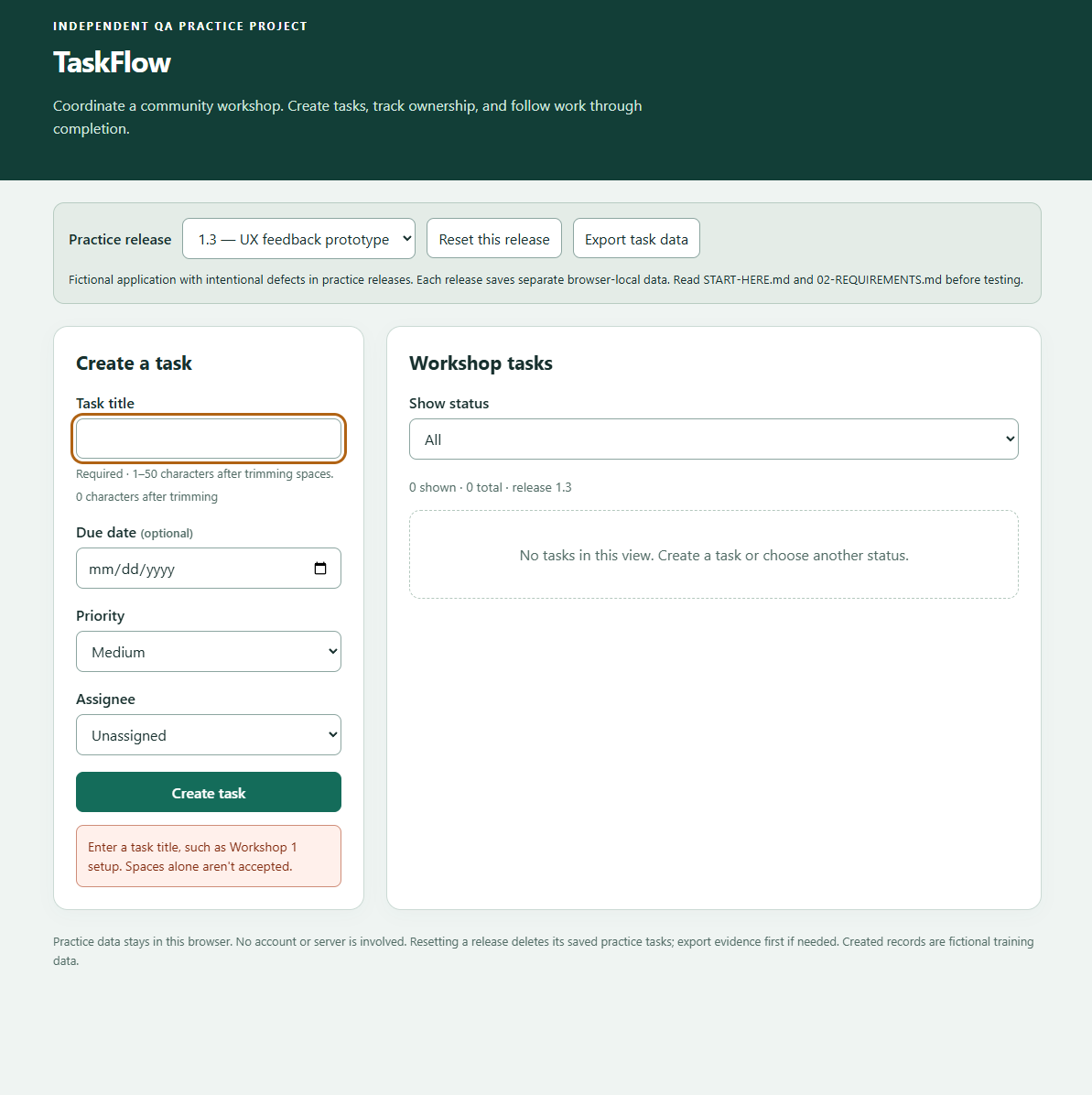
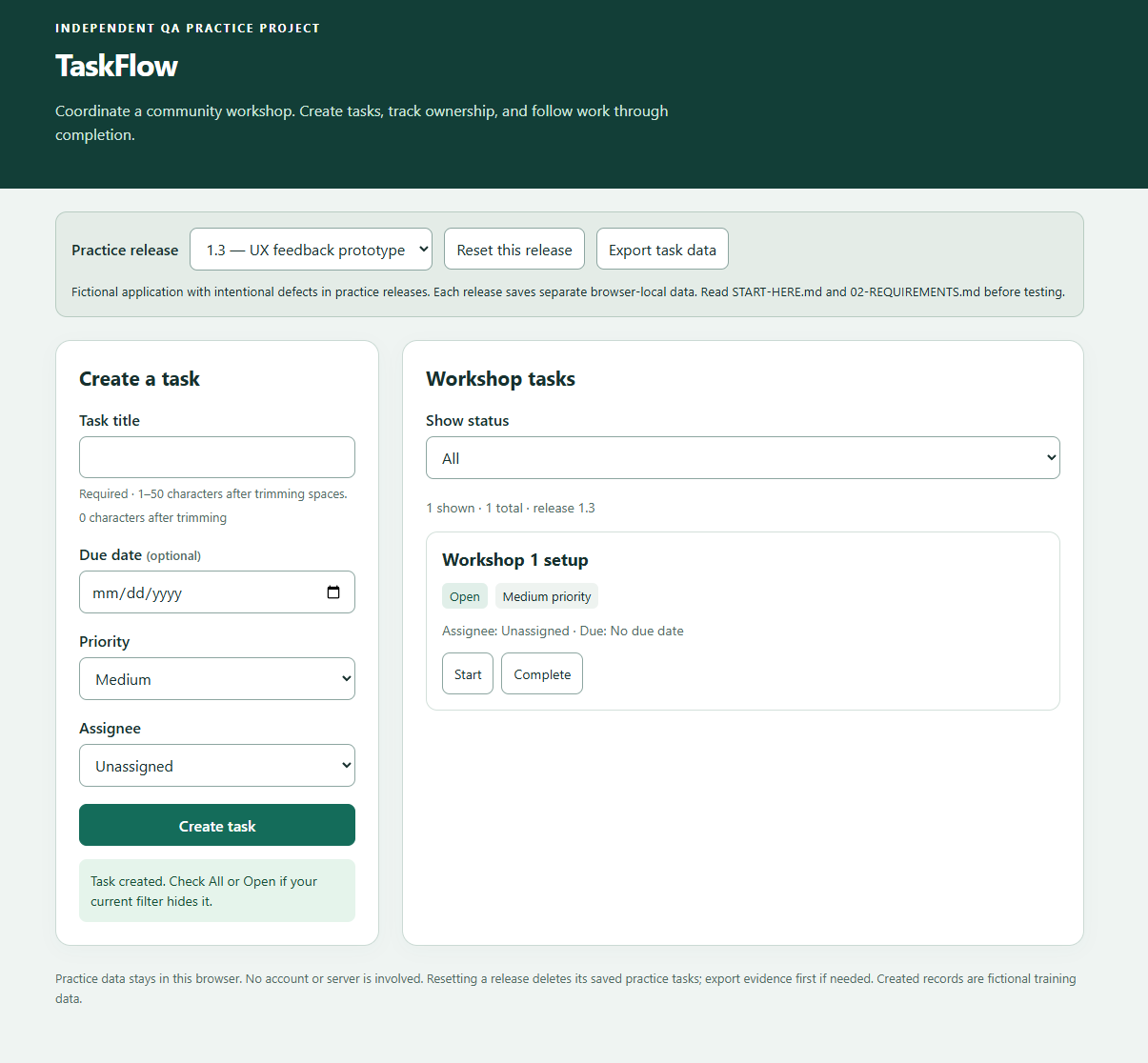
A saved task lost its deadline after refresh. A spaces-only title also created an untitled record and received green success feedback. On prototype 1.3, I checked a controlled dated task and verified invalid-input rejection followed by successful correction.
I proposed feedback beneath the submission button. The assistant implemented it and helped refine the wording; I verified that no invalid record was created and that correction produced exactly one valid task.
What I learned
An expected rejection can be a passing test. A useful defect record distinguishes the rule, the actual behavior, and the user’s recovery path. I also learned that existing data changes expected filter counts, so a fixture needs to be explicit before execution.
Invalid input rejected · RUN-004The error appeared beneath the button and no task was created. Open image for full evidence.Correction accepted · RUN-005One meaningful task was created and the error cleared. Screenshot records use fictional data.
Scope: Windows desktop / Chrome; exact versions weren’t recorded. The original date failure has limited initial evidence; the passing check used explicit inputs on 1.3. The 50-character count is learner-reported. No participant usability study, mobile coverage, or full accessibility audit was performed.
03 / SHOPFLOW
When the rules interact, does the total still add up?
SCOPED PRACTICE COMPLETE / OCT 14
A fictional workshop-supply shop introduced numeric expectations and business-rule interactions. I tested quantities, promotions, delivery, checkout validation, and the separation between a current cart and a saved order.
Compare the expected arithmetic with the displayed result.
Recorded failures on 1.0 and matching checks on 1.1 · fictional USD amounts
Rule
Expected / observed on 1.0
Follow-up on 1.1
Quantity multiplication
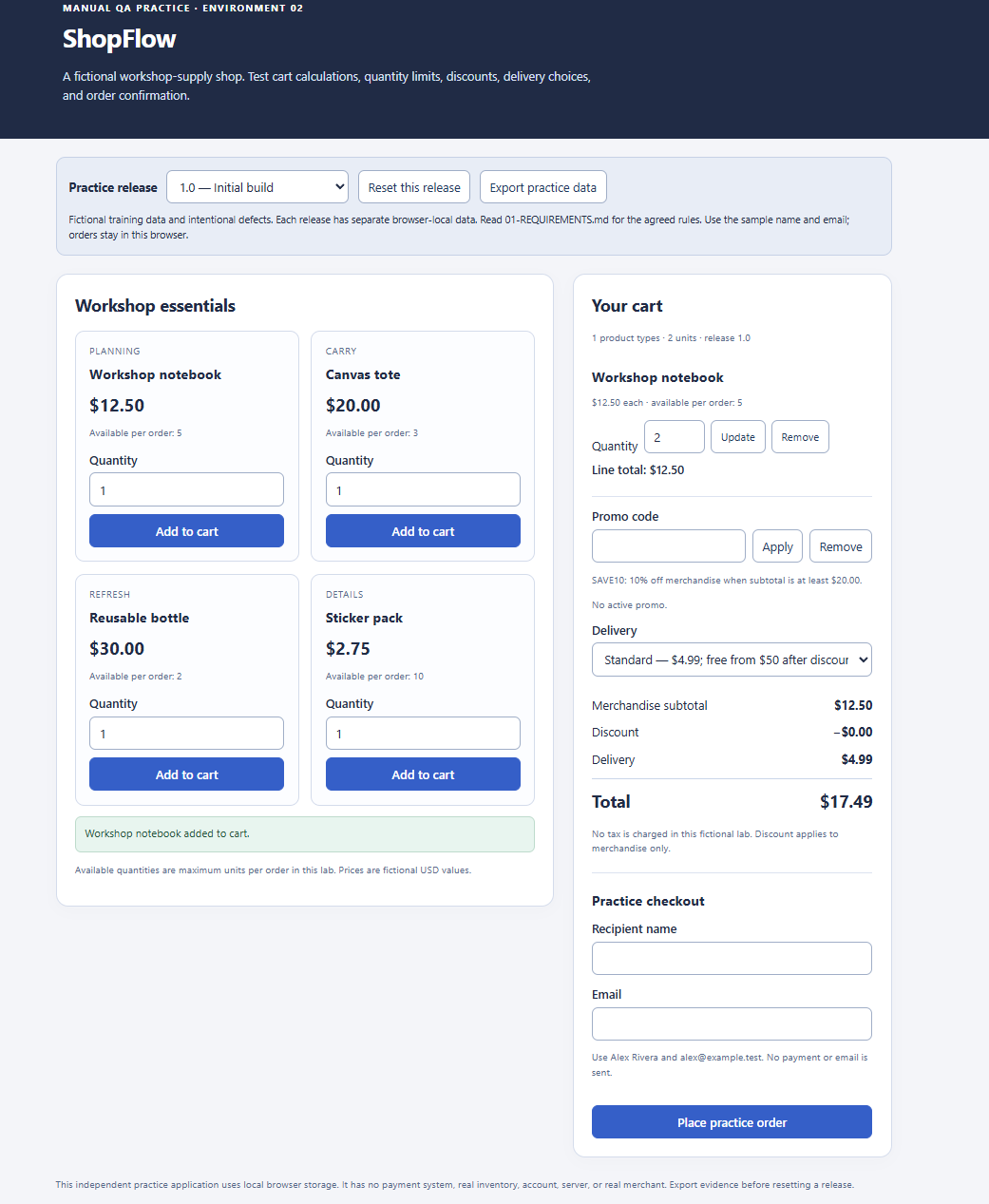
Two notebooks with Standard delivery: $29.99 expected; $17.49 shown. Updating to three still priced one.
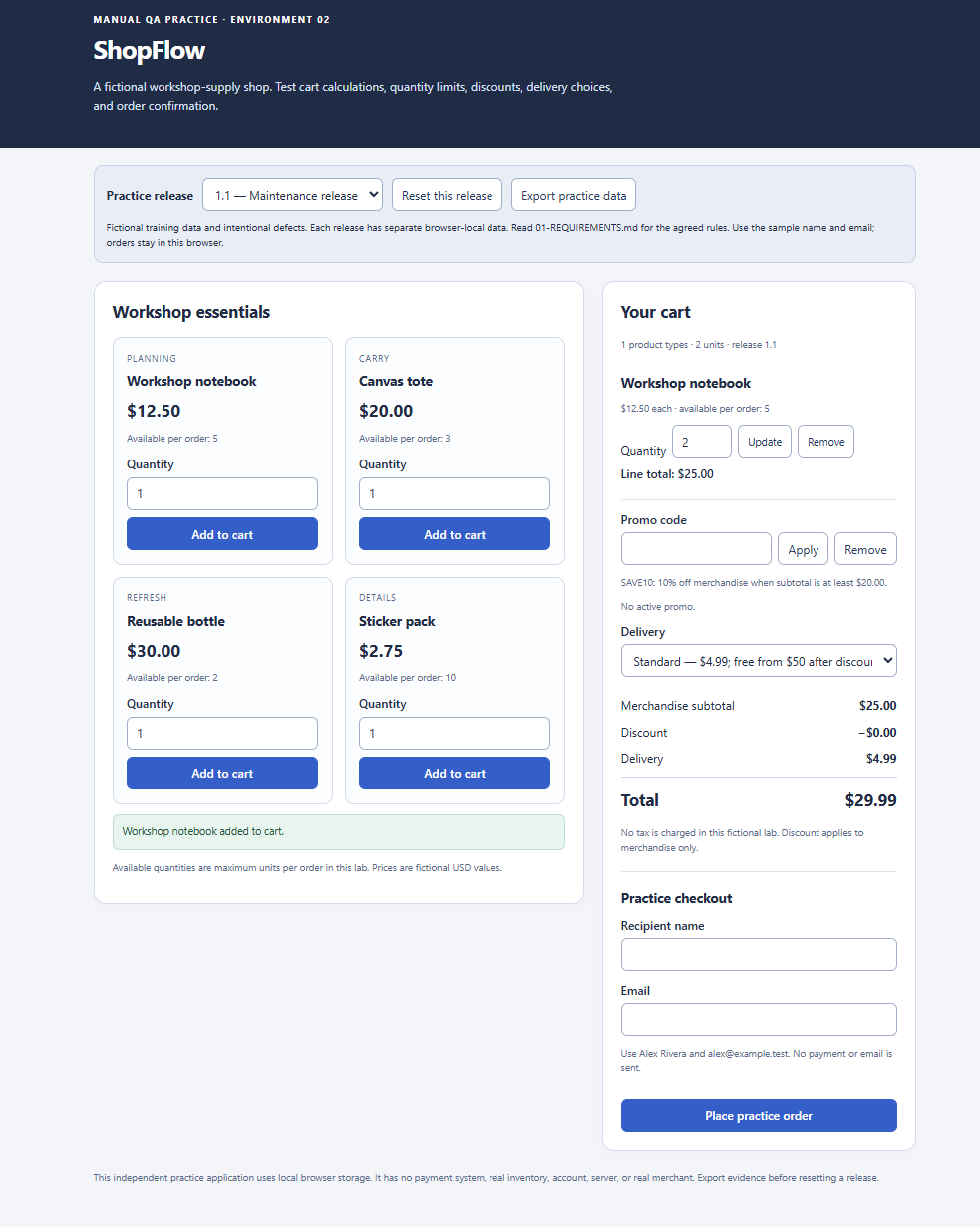
The two-unit Add and three-unit Update matched their expected amounts.
Promo at its exact minimum
SAVE10 at a $20 subtotal: $22.99 expected; promo rejected and $24.99 shown.
The same $20 fixture accepted SAVE10 and totaled $22.99.
Delivery after discount
A $50 cart discounted to $45 required $4.99 delivery: $49.99 expected; $45 shown.
The same items and promo showed $49.99, including delivery.
Test the recovery, not just the error.
I isolated blank name and invalid email separately, then followed correction through successful checkout and refresh. The cart and entered values remained available for correction. I noticed the email field receiving focus as a visible correction target.
Separate current and historical state.
I checked that a new Notebook/Express cart at $22.49 didn’t rewrite saved order SF-001 at $49.99. I also exercised five-notebook Update acceptance, six-notebook rejection, and preservation of the last valid quantity.
What I learned
Calculate an expectation before trusting the UI. Check eligibility exactly at a threshold, and evaluate delivery using the amount the requirement specifies. I authored the five-notebook Update steps; review corrected my expected delivery amount. Four failed runs represented three defects, not four distinct findings.
Quantity defect · SF-RUN-001The displayed units and subtotal disagreed. Open image for the full calculation evidence.Matching retest · SF-RUN-003The maintenance build displayed the expected $29.99 total for the same fixture.
Scope: Windows desktop / Chrome, with versions unrecorded. Twenty screenshots support 17 runs; one run is report-only. A separate stale-promo-feedback issue was observed by the assistant and remains an open UX proposal; it isn’t counted as my discovery. Broader quantity inputs, rounding, accessibility, mobile, and other browsers remain gaps. No real payments occurred.
04 / BOOKINGFLOW
Test the boundaries. Then test who can act.
SCOPED PRACTICE COMPLETE / OCT 15
A fictional community venue added customer/staff roles and scheduling workflows. I developed eight test designs from supplied goals with mentor review, then executed the reviewed plans through forms, menus, and buttons.
10 executions: 9 Pass / 1 Fail1 viewing-permission defect8 learner designs developed with review25 screenshots
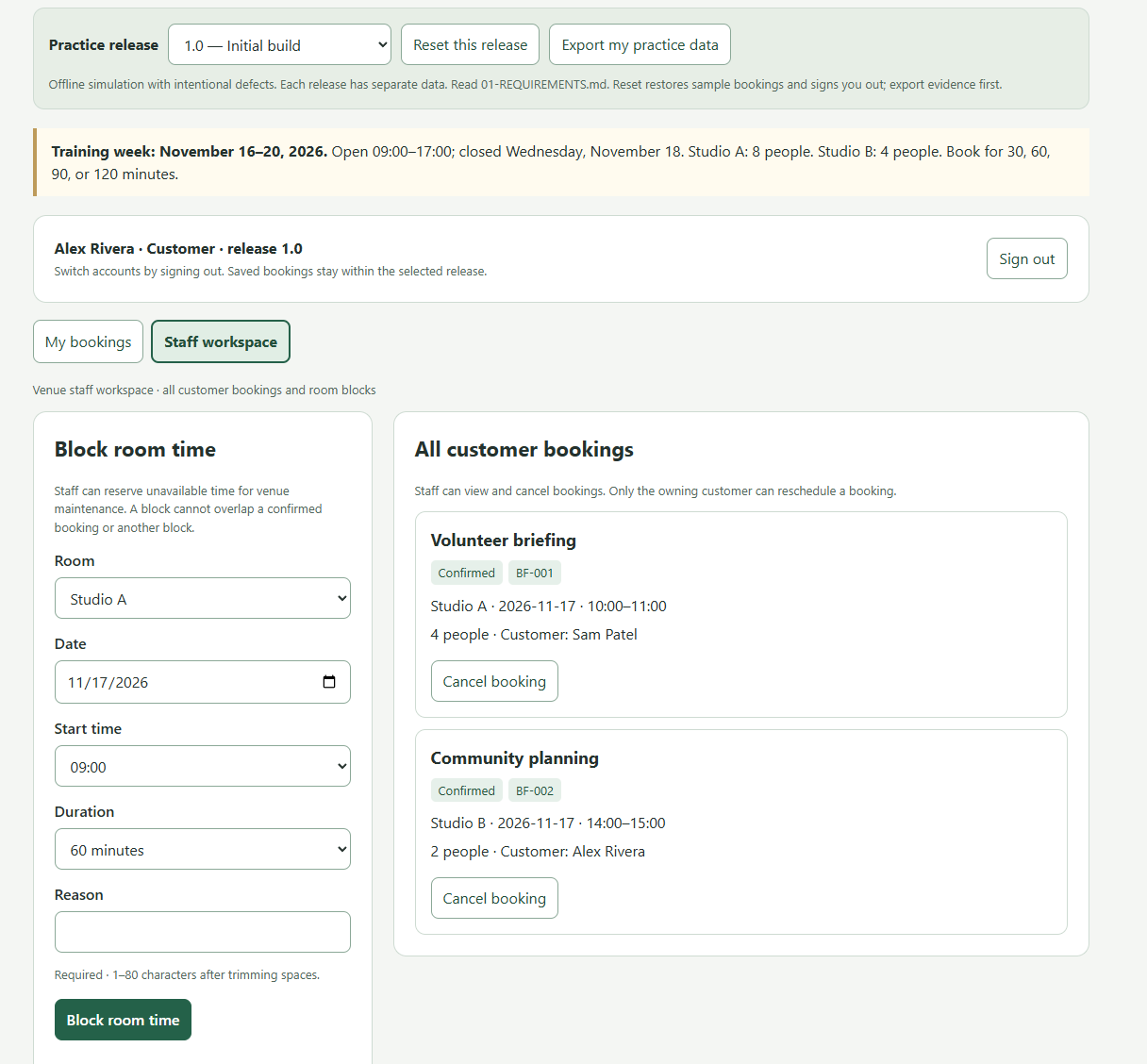
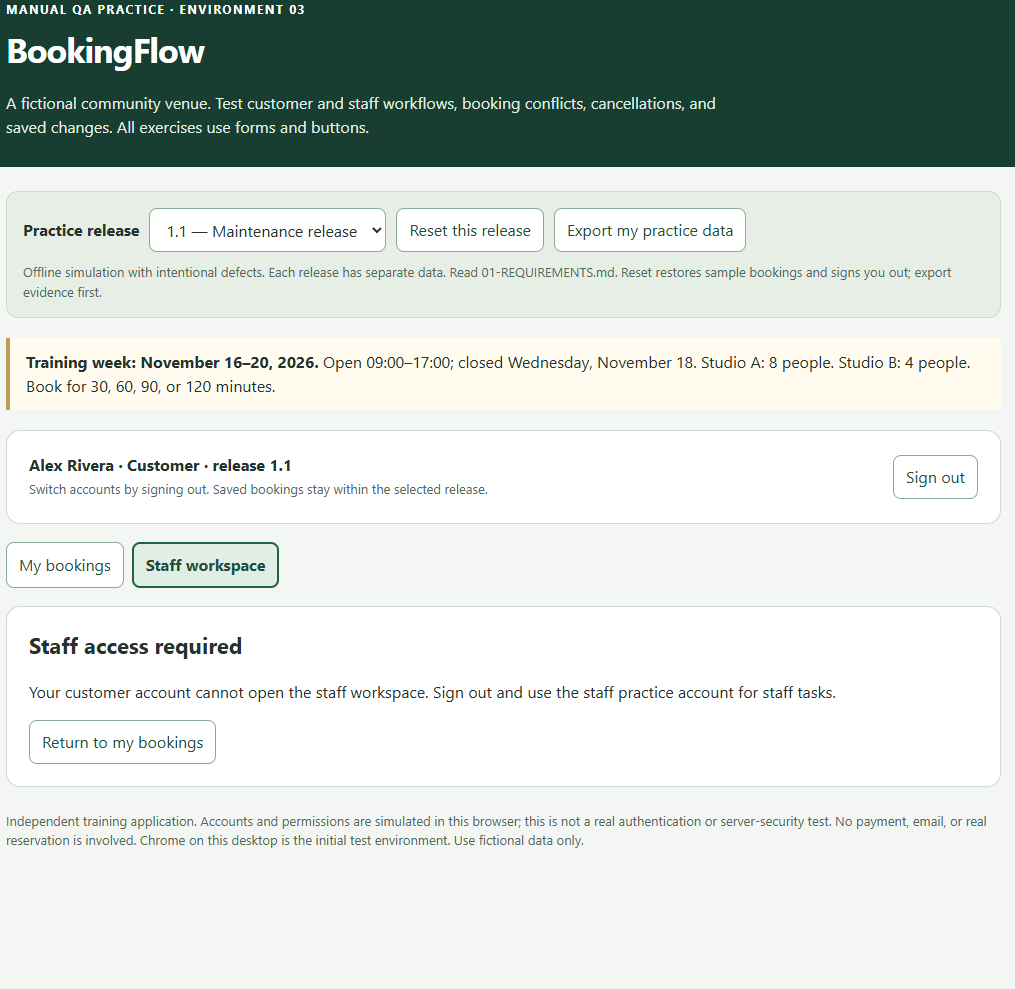
BF-BUG-001 / CUSTOMER → STAFF VIEWING
A customer could open the staff workspace.
On 1.0, Alex’s Customer account displayed Sam’s booking details and staff management controls. That violated the supplied permission matrix. My evidence established unauthorized viewing; it didn’t establish successful unauthorized modifications.
On 1.1, I repeated that customer action and received “Staff access required,” with staff contents hidden. A related positive check confirmed Morgan Staff could still view customer bookings. This was an exact-case retest plus a related authorized comparison.
Representative recorded comparisons on practice release 1.1
Area
What I compared
Observed result
Capacity
Studio A: 8 people versus 9.
8 accepted; 9 rejected. Saved records remained after refresh.
Scheduling
An overlapping 12:00–13:00 interval versus 13:00–14:00 after an existing 13:00 end.
Overlap rejected; adjacent interval accepted.
Cancellation
Cancelled history versus a new booking in the released interval.
BF-004 stayed Cancelled; BF-005 used its former interval and both persisted.
Rescheduling
A valid move versus a conflicting edit.
Valid move retained the booking ID. Rejected edit preserved saved values after refresh.
Staff blocks
Customer booking while BL-002 existed, then after staff removed it.
Blocked first; accepted afterward. Unrelated records remained.
Account isolation
Sam, Alex, and Morgan’s booking-list views.
Sam saw one own record, Alex five, and Morgan all six; Alex’s view persisted after return/refresh.
What I learned
Use the rule to define the expected result. Review corrected my initial assumptions about 8/9-person capacity and adjacent intervals. I learned to isolate one invalid condition, distinguish staff blocks from customer bookings, and verify that a rejected edit leaves saved data intact.
Customer viewing failure · BF-RUN-002A customer could view content intended for staff in this local role simulation.Matching denial retest · BF-RUN-003The same customer action showed the expected denial on the maintenance build.
Scope: 9 distinct executed designs—one supplied baseline and eight developed with review. Retesting reused a case; multiple checkpoints weren’t counted as extra executions. Windows desktop is known and Chrome was reported initially; later browser identities and exact versions weren’t confirmed. Accounts are locally simulated, so this isn’t a production authentication or security assessment. Mentor review supplied triage guidance and corrected some fixtures and expectations.
05 / QA SKILLS & WHAT I’VE LEARNED
How I work in QA.
These projects are the basis for the manual QA skills I can demonstrate and explain. My focus is clear reasoning, careful execution, and evidence that another person can follow.
01 / REQUIREMENTS → TEST DESIGN
Turn rules into observable checks.
I define setup, inputs, steps, expected results, and evidence checkpoints. BookingFlow taught me to replace assumptions with the stated capacity and interval rules. Across the projects, I developed and executed 11 learner-authored designs with review; most TaskFlow and ShopFlow starter designs were supplied.
02 / BOUNDARIES & BUSINESS LOGIC
Test the edge of the rule.
I practiced title length at 50/51 characters, quantity Update at 5/6 notebooks, SAVE10 at its exact $20 minimum, capacity at 8/9, and overlapping versus adjacent bookings. I compare calculations and eligibility against explicit expectations before assigning a verdict.
03 / MANUAL EXECUTION & DOCUMENTATION
Make the result reproducible.
I record the release, account or fixture, expected and actual result, verdict, and evidence reference. The early TaskFlow date report showed why missing inputs weaken a record. Later checks used controlled fixtures and before/after screenshots. My evidence packages preserve the original failures alongside follow-up passes.
04 / DEFECTS, RETESTS & RELATED CHECKS
Verify the same failure condition.
I describe the discrepancy and its workflow impact, then repeat a matching fixture on the maintenance build. ShopFlow paired failed calculations with matching passing checks; BookingFlow paired denied customer access with allowed staff access. I keep test executions, distinct designs, and distinct defects separate.
05 / STATE & DATA INTEGRITY
Check what survives a change.
I compare values across refresh, status changes, cancellation, and rejected edits. TaskFlow covered owners and deadlines; ShopFlow separated a new cart from a saved order; BookingFlow checked booking IDs, history, account-specific lists, and saved values after a conflicting edit.
06 / ROLES & USER FEEDBACK
Connect correctness with clarity.
I compare allowed and denied viewing against a permission matrix, and inspect error feedback, retained input, and visible focus. In TaskFlow I proposed the feedback placement; in ShopFlow I noticed email-field focus. These are evidence-based interface observations, not measured usability improvements or a full accessibility review.
The standards I bring to a QA role
I make expectations explicit, distinguish observations from assumptions, preserve failure evidence, and communicate the scope of a result. I’m comfortable revising a test after review and explaining what the evidence supports. I treat a passing case as evidence for that fixture, with broader coverage still to assess.
Where I’m developing next
Deeper input and rule coverage, deliberate cross-browser/device execution, keyboard and assistive-technology checks, and more independent test planning. The completed work here is manual UI testing; automation, API testing, SQL, production security testing, and release ownership aren’t part of these project claims.
06 / THE EVIDENCE
Follow the work back to the records.
Each package includes its case study, requirements, test records, execution log, defect reports, screenshots, and closeout limits. Sample people, orders, and bookings are fictional. The original local-package notes are retained as historical project artifacts.
TaskFlow
11 executions · 18 screenshots Validation, status & saved data